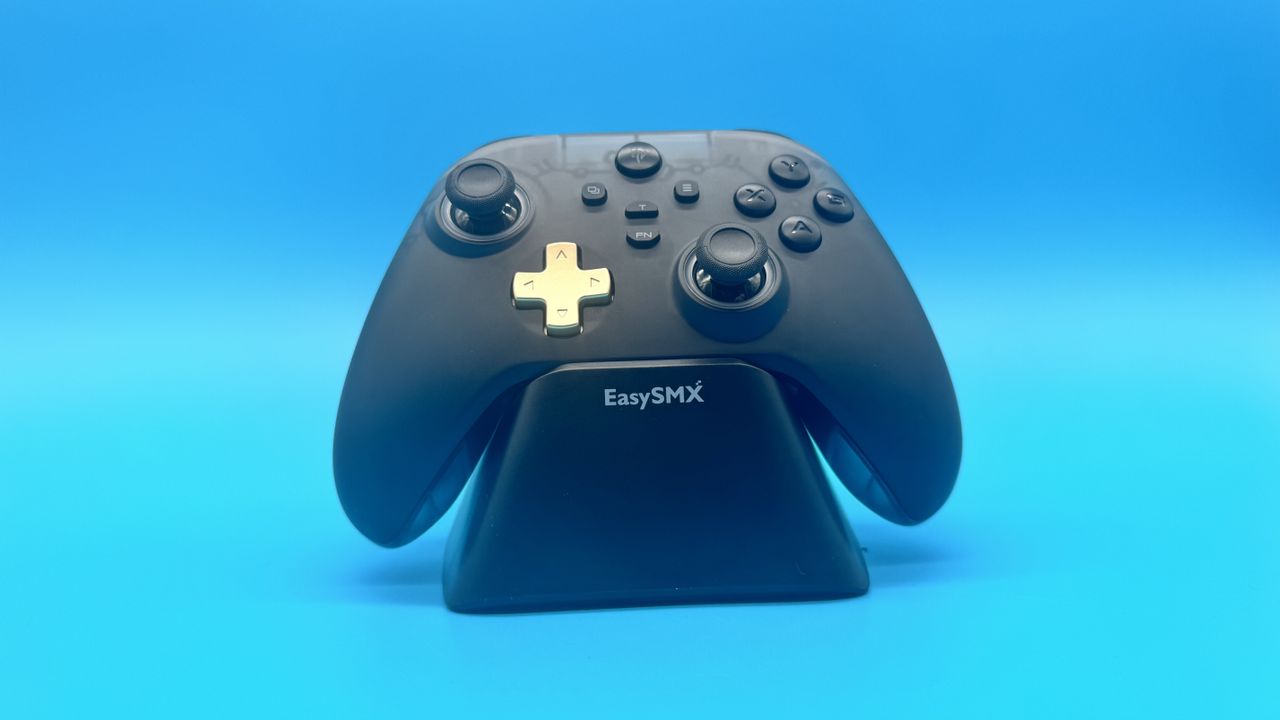
EasySMX D05 review
Overview & Key Takeaways
You can get Hall effect controllers slightly cheaper, but you'd struggle to find as feature-rich a package without some heavy, heavy sales.
With both TMR and Hall effect controllers coming down in price, the question is no longer 'is Hall effect worth it?' but 'is it cheap enough to not just upgrade to TMR?' And I've had that question in my hand over the last few weeks, comparing the EasySMX D10 and D05 head-to-head. After that time, I can say the answer is 'it depends'. I know that's an unsatisfying answer, but reality is rarely straightforward.
The D05 comes in a single colourway, but luckily, I like it. It's all black, except for a golden D-pad and golden triggers. The bumpers, notably, are a similar black to the face buttons and joysticks, and the whole thing looks both rather flashy and fairly clean. The included charging stand is relatively basic, in contrast, being black all over with 'EasySMX' written on the front.
However, once plugged in and on, the controller kicks into life and becomes even showier. There is a set of RGB lights underneath each thumbstick. The black plastic has a fair amount of light leakage, fitting somewhere between a normal controller and the aesthetics of that old, see-through Xbox. Light leakage, when paired with RGB, can sometimes look a little cheap, but the D05 mostly pulls it off.
That's all helped by the fact that the controller itself feels sturdy and comfortable in the hands. It's very clearly based on the Xbox Series X controller, with asymmetric sticks, textured grips, and Xbox's iconic shape. EasySMX has done a great job here, feeling almost identical to one of Microsoft's controllers, barring the extra weight.
EasySMX D05 specs:
(Image credit: EasySMX)
Compatibility: Windows, Switch, Android
Connectivity: Wireless (2.4 GHz and Bluetooth) and Wired
Ports: USB Type-C
Thumbsticks: Hall effect
Polling rate: 1,000 Hz
Triggers: Hall effect
Thumbstick layout: Asymmetrical
RGB: Yes
Battery life: 10-20 hours
Extra features: Two reprogrammable buttons, included charging dock
Weight: 219 g (300 g with dock)
Price: $45 | £35
At 219 g, the D05 is certainly fairly light, but it has no flex and only really gives away its very budget price in a slight rattle. In fairness, it only produces a rattle when shaken, so it rarely comes up in use. For the most part, it punches above its weight in look and feel.
Solid build quality feels like the cherry on top of the cake here, when you are getting a 1,000 Hz polling rate, a charging dock, three connectivity modes, and Hall effect triggers and thumbsticks for less than the price of Sony and Microsoft's offerings. The D05 is already regularly available for just $35 over on Amazon, at the time of writing, and I'd struggle to find anything better for its current price, except maybe the D10 over here in the UK, where it gets down to £30.
The 8BitDo Pro 3, my usual everyday controller, has a great aesthetic, a neat charging dock, and TMR thumbsticks. It's also just under double the price, and comes with a polling rate of just 250 Hz (a quarter of the D05). It's not even that far off the price of the GameSir Nova Lite, which is our current pick for the best budget controller, and comes with a whole host of premium features to justify the extra cost.
Keep up to date with the most important stories and the best deals, as picked by the PC Gamer team.
Comparing the EasySMX D10 and D05 together, it's not immediately clear to me which one is better. The stand and in-box presentation of the D10 is certainly flashier, and the D10 has TMR thumbsticks, alongside dual-mode triggers (Hall effect and non-linear micro-switch). But I actually prefer the aesthetic of the D05; it comes in tens of dollars cheaper, and I like its D-pad more. If you need TMR, the D10 is the only choice between the two worth considering, but if that's not the case, both put up a fight.
The four-arrow D-pad is easy to use, and though it doesn't have a super-defined click, I rarely found myself misclicking. The triggers are also very solid, with a smooth press and textured tops. I spent honestly far too long throwing out coins with the triggers in coinpusher roguelike Raccoin, and found myself with very little fatigue, even after hours.
Moody horror FPS Crisol: Theatre of Idols performs well, too, in this regard. Triggers are satisfying to click, and the thumbsticks are easy to control. I rarely struggled to hit baddies in the head, and when I miss, I struggle to blame the controller for it.
I did notice the face buttons are oddly textured. There's a fairly deep groove indicating which button is which. Those grooves are so deep that I can regularly make out which button I'm on, with just my thumb. This can also make them dust and grime magnets, which is a problem that controllers already suffer heavily from. After a little time, I did get used to these heavily etched buttons, but it's certainly an oddity.
I did find the controller to accommodate the fast clicks and reliance on face buttons in the Soulslike action RPG No Rest for the Wicked. Combining all of the above, the D05 took on the challenge of precise actuation and tight controls in Rocket League with ease. In play, I found it lacking in almost no regard. It even has two back paddles, which can be easily customised with the controller's built-in function button.
Arguably, the cheapest part of the controller is its charging dock. It's simply a black box, with a USB Type-C and Type-A port on the back, and charging prongs on the top. It's missing the RGB and recessed 2.4 GHz connector port of its more expensive controller cousin, but its only real fault is feeling a tad plasticky. The 2.4 GHz does sit out at a slightly awkward angle in the back, but the likelihood of showing off the back of the stand is very slim either way.
Buy if…
✅ You're sick of stick drift: With Hall effect thumbsticks, this is a relatively cheap way of getting around stick drift.
✅ You forget to charge: The D05's included charging dock is simple but effective, and encourages me to charge it basically every time I'm not using it.
Don't buy if…
❌ You want better than Hall effect: The EasySMX D10 isn't a whole pile more, and comes with TMR sticks. In practice, I didn't find the D10 to be better to control, but it's close enough in price to be worth considering.
❌ You want something more muted: Though you can turn off the RGB, the gold trim is certainly a little flashy.
One peculiarity with the D05 (and D10 by extension) is that they both lack any PC software. With the function button, you can change RGB intensity and colour, as well as customise vibration, and you can even adjust actuation in the triggers for a rapid trigger mode, but you will have to learn all of its function controls to get the most out of it. While it's mostly fine to use without any dedicated software, it would be more convenient to have a PC app or browser-based interface to configure it all.
The D05 gets between 10 and 20 hours of charge, depending on vibration and RGB level, and for me, that is more than enough. The charging stand's convenience means I regularly got into the habit of popping it on charge every night, and I've never seen it go dead.
Despite trying to broadly emulate the Xbox Series X controller, I think there's an argument to be made that it's actually a better package. For approximately half the price, you are getting stick drift resistance, that charging dock, quadruple the polling rate, a solid enough battery life, a neat aesthetic, and a whole host of extra features. It's not quite as firm in the palm, and its weight isn't as fine-tuned, but I can't name a single other controller at the $35-$45 price range I'd be picking instead.
Best PC controller 2026