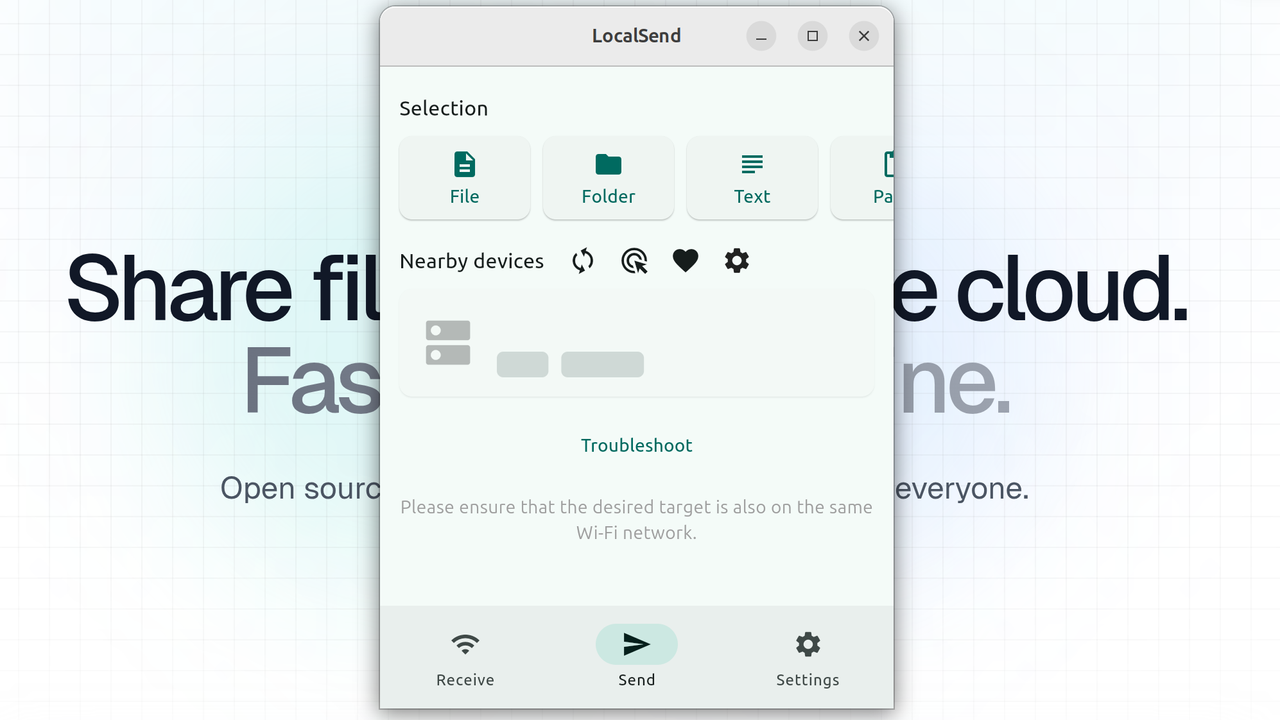
LocalSend is the most useful app I've come across in a very long time, letting me share files across devices with a couple clicks
🖥 PCNews
🎮 LocalSend#Software

LocalSend is the most useful app I've come across in a very long time, letting me share files across devices with a couple clicks

PC Gamer RSS FeedJacob Ridley3 min read(5 months ago)

Overview & Key Takeaways

Open source and free.

I'm often moving a lot of files around a host of different devices. Photographs taken on my iPhone are sent to my Windows PC for editing. Then over to my work laptop, which I recently switched to Ubuntu, to upload to PC Gamer. The application that makes it all possible, and convenient, is LocalSend.

LocalSend is totally free. It's also open source and end-to-end encrypted using HTTPS. You don't even have to create an account or log in to use it—it's the sort of application that doesn't outstay its welcome at a time when many do. And, hey, some might view singing praise as a sponsored post in disguise, but it's not. Credit where credit's due on this one—free software that does a job and does it very well is worth calling out, in my opinion.

The app lets you transfer files between devices on the same network. I've seen it described as open-source AirDrop, which maybe means more to you Apple-heads than it does me. The key thing here is that it's not for sharing files across different networks ( i.e. the internet), it's localised to the network you're connected to. Ideal for shifting files around a multitude of devices with different operating systems. It supports Windows, macOS, Linux, Android, and iOS. I use it on an iPad, too.

"LocalSend is a cross-platform app that enables secure communication between devices using a REST API and HTTPS encryption," the website says. "Unlike other messaging apps that rely on external servers, LocalSend doesn't require an internet connection or third-party servers, making it a fast and reliable solution for local communication."

Install the application, and it'll happily run in the background until required, or you can just boot it up when you need it. It only takes a second to pop up, so if you can't spare the background usage. On my Ubuntu machine, it makes use of 0.3% CPU utilisation and around 100 MB of RAM when open, and drops down to nil utilisation when minimised. Nice.

(Image credit: LocalSend)

What's even nicer is the web app. I don't tend to use this myself, just as I don't mind installing the app everywhere for convenience, but you can load this up on any machine with ease.

It'll transfer all sorts of things. Files, folders, even text or links. So long as you have LocalSend open on multiple devices on the same network, it only takes picking something to send on one device, selecting a nearby device from the list (each device has an auto-generated name), and then accepting the send request on the other device. Job done. Any files or folders sent will show up in downloads.

The application does struggle a bit on corpo internet. When the powers that be keep the flow of information locked behind firewalls and admin access, plucky lil' LocalSend doesn't stand a chance. But so what if airports and offices are mostly out of the question? It's the day-to-day stuff that really matters most for me.

It's a lot better than sending yourself messages on WhatsApp, and a damn sight better than moving files between machines with sluggish USB drives. Running your own Network Attached Storage (NAS) might work a treat for mass sharing files or folders—I'm actually testing a NAS now, and I totally get it—that could be costly or involve more steps. LocalSend flourishes in its simplicity and the fact that it's free.

So, if you're in a similar boat to me and need to shift a lot of files around without delay or the usual USB drive dance, LocalSend is well worth a look.

Best gaming laptop 2026

Share:

More in PC

Onimusha: Way of the Sword - Stout Pillar locations🖥 PlayStation, Nintendo Switch, Xbox, PC

Onimusha: Way of the Sword - Stout Pillar locations

!(https://assetsio.gnwcdn.com/stout-pillars.jpg?width=690&quality=85&format=jpg&auto=webp) Early on in Onimusha: Way of the Sword(https://www.rockpapershotgun.com/games/onimusha-the-way-of-the-sowrd), you'll be tasked with finding three sentient idols that have been stolen from Hachidai Rikison Shrine in eastern Kyoto. These idols, dubbed the Stout Pillars, are hidden in different spots around the city, and you'll need to track them down in order to finish the "Careful What You Wish For" quest. In this guide, we'll reveal the locations of the three Stout Pillars and tell you everything that you need to do in order to locate all of them and advance the quest. Read more(https://www.rockpapershotgun.com/onimusha-way-of-the-sword-stout-pillar-locations)

RockGuides / Walkthroughsabout 4 hours ago
Onimusha: Way of the Sword - All bosses🖥 PlayStation, Nintendo Switch, Xbox, PC

Onimusha: Way of the Sword - All bosses

!(https://assetsio.gnwcdn.com/rasho-gan.jpg?width=690&quality=85&format=jpg&auto=webp) Onimusha: Way of the Sword(https://www.rockpapershotgun.com/games/onimusha-the-way-of-the-sword) marks the triumphant return of Capcom's samurai action franchise after a twenty-year hiatus, with all of the hallmarks that it possessed back in the PlayStation 2 days, including fast action, Issen counterattacks, and plenty of screen-filling bosses. Miyamoto Musashi will need every ounce of his wits and skill to beat these contenders, many of whom are dangerously fierce and reminiscent of Soulslike opponents, even though Way of the Sword is more of a traditional hack 'n slash action adventure game. Way of the Sword offers two difficulty modes upon startup, including a Story Mode that will let you decimate most enemies in your path. But on Action Mode, none of these bosses are a walk in the park, and some will even be a challenge on Story Mode. To help Musashi rise supreme against all contenders, we've got you covered with our comprehensive list of all bosses in Onimusha: Way of the Sword, along with strategies for beating them. Read more(https://www.rockpapershotgun.com/onimusha-way-of-the-sword-all-bosses)

RockGuides / Walkthroughsabout 4 hours ago
Onimusha: Way of the Sword - How to get Power Stones🖥 PlayStation, Nintendo Switch, Xbox, PC

Onimusha: Way of the Sword - How to get Power Stones

!(https://assetsio.gnwcdn.com/musashi-standing-by-shrine.jpg?width=690&quality=85&format=jpg&auto=webp) Power Stones in Onimusha: Way of the Sword(https://www.rockpapershotgun.com/games/onimusha-the-way-of-the-sword) are one of the most important currency types you can get. You need Power Stones to unlock most of Musashi's major skills. And yet for all their significance, Way of the Sword never tells you where or how to find them. There are two main ways of getting Power Stones. One is largely outside your control, as it happens naturally while you progress the story. The other takes a bit of tracking down, and careful exploration of each level outside of the central Kyoto hub. In this guide, we'll explain how to get Power Stones in Onimusha: Way of the Sword and what to look out for while you're searching for treasure. Read more(https://www.rockpapershotgun.com/onimusha-way-of-the-sword-how-to-get-power-stones)

🎮 Control
RockGuides / Walkthroughsabout 4 hours ago