Thermaltake View 380 WS ARGB review
Overview & Key Takeaways
Affordable and flashy.
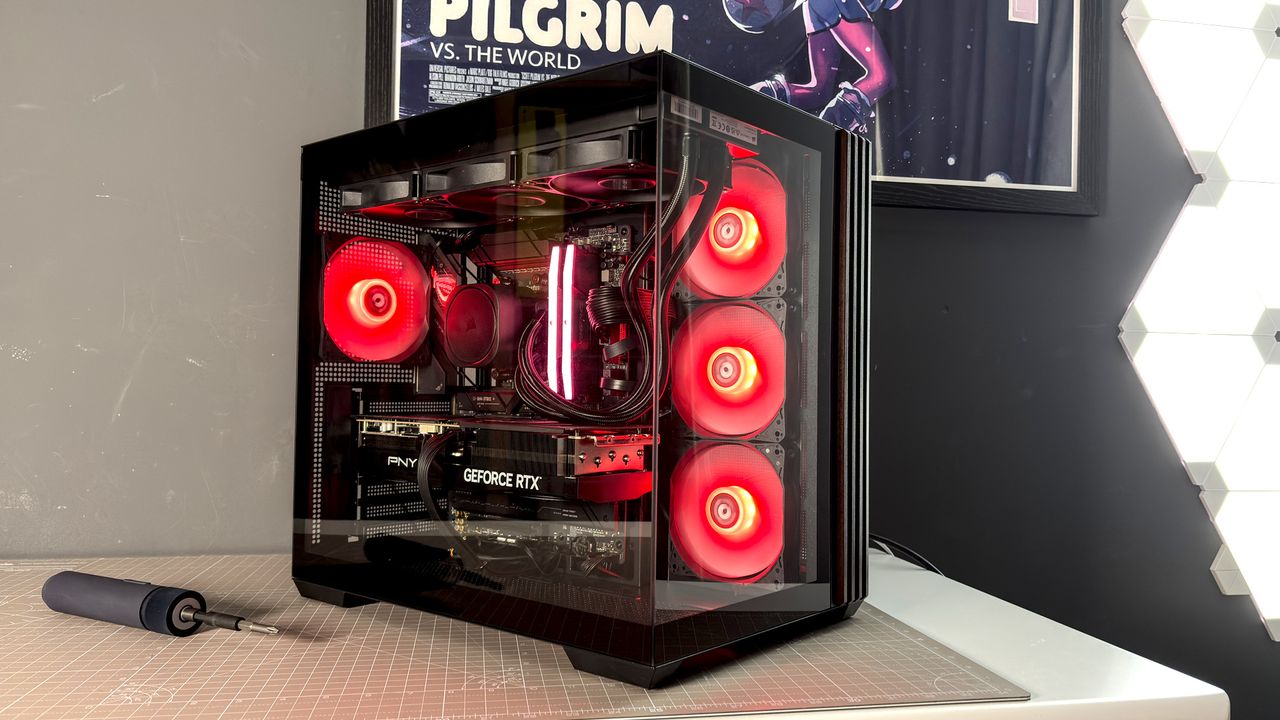
The Thermaltake View 380 WS ARGB looks a million bucks. Bearing the hallmarks of many a high-end case today, it includes a front panel made of tempered glass with wooden trim. How suave. It even includes three reverse fans for a more cohesive appearance. And yet, it's shockingly affordable.
This case costs $120/£90. A very tempting price considering there are four fans already installed in the chassis: three ARGB Lite Reverse Fan and one ARGB Lite Fan. Reverse fans are key for intake in a case like this, drawing in fresh air without showing their uglier rear-end. They look great here.
The View 380 WS supports motherboards from Mini-ITX up to ATX. It's relatively compact for its size, at 411 x 285 x 447 mm. That means it's only a little taller than the biggest motherboard it supports. Though it's easy to build into, as both side and front panels come away. It also features a dual-chamber design that helps keep its size down, with storage and power supply fitting neatly in the back of the case and away from eyeballs.
There's a surprising amount of room for everything in the rear chamber. The PSU is mounted on its side with a tray beneath for mounting up to two 2.5-inch SSDs and 3.5-inch HDD. You can also tuck away unruly cables behind this tray, which helps save on some cable management. But not all. Cable management is a bit of a sore spot for the View 380 WS. It lacks particularly defined channels for keeping cables tucked away, and what it does include for this end, zip-ties and Velcro straps, saw me fiddling for longer than other cases I've tested as of late.
View 380 WS specs
(Image credit: Future)
Size: Dual-chamber
Motherboard support: Mini-ITX, M-ATX, ATX (and Reverse-connector)
Dimensions: 411 x 285 x 447 mm
Maximum GPU length: 415 mm
Radiator support: Up to 360 mm (top, side)
Fan support: Up to 3x 120 mm (top, side, bottom) | 1x 120 mm (rear)
Fans included: 3x ARGB Lite Reverse fan (1000 rpm) + 1x ARGB Lite fan (1000 rpm)
Storage bays: 1x 3.5-inch/2x 2.5-inch
Front panel: 1x USB 3.2 Gen 2 Type-C, 2x USB 3.0 Type-A, 1x audio jack
Price: $120/£90
The aforementioned fans took a while to get presentable. Each uses a pair of lengthy cables that can either terminate on your motherboard or daisy-chain to the next one. Daisy-chaining makes the most sense but it's not the tidiest execution. Similarly, all the screws you'll require for a PC build are lumped together into a single bag here, which may leave you guessing which ones go where if you're not familiar.
You could ditch cable management altogether—if the rear of the case was a complete shambles, you wouldn't be able to tell from the front. The rubber grommets to the right and top of the motherboard do a good job of keeping cables in check without alluding to the chaos behind, and while below the motherboard lacks any such grommets, the tray behind blocks out most of the mess for the handful of cables that run through here.
It doesn't take much effort to build a good-looking PC in the View 380 WS. That's a real compliment with a case at this price point.
Keep up to date with the most important stories and the best deals, as picked by the PC Gamer team.
Though there are signs of cost-cutting, and none more obvious than the non-replaceable expansion slot covers. This feels like a real miss. Not only are the expansion slot covers one-and-done but they're also hard to remove cleanly. I had to get a pair of pliers out to wiggle each one free, which slightly bent the thin metal struts that remain in place after the cover is gone.
Thermaltake View 380 WS ARGB
Noise testing with Toptes TS-501B sound level meter
Noise level
Thermaltake View 380 WS ARGB
Noise level Data
| Product | Value |
|---|---|
| Thermaltake View 380 WS ARGB | 43 Sound floor (dB), 45 Idle (dB), 49 60% (dB), 60 100% (dB) |
There is a chance that you never have an issue with the covers. It's only if you install something into a slot, like a triple-slot graphics card (as I did here), or use another expansion slot on your motherboard, such as PCIe-attached storage, that you'll end up breaking another off. If you ever remove these components for good, you'll be left with an unsightly gap. Some may find this more bothersome than others, but even at this price, I'd much prefer expansion slot cover that simply slotted back into place once I'm done.
There are also no dust filters anywhere on this case, which may require more frequent cleaning.
Buy if...
✅ You care about aesthetics: The View 380 WS looks like it costs a million dollars. Or at least, like, $130–150.\
✅ You want a cuboid case: I think cuboid cases are some of the best designs out there, and if you're in the same camp, this is one of the cheaper options with everything you need included in the box.
You can fit up to 3x 120 mm fans (or a 360 mm radiator) into the top of the case. There's also room for the same in the bottom of the case. Though I'd advise against installing an all-in-one liquid cooler this way, as it may shorten its lifespan. Any air bubbles in the loop (and there are sure to be some) rise to the highest point; ideally the radiator, not the pump. Also, the motherboard sits pretty close to the top of the case, so a push/pull config for a top-mounted radiator is likely out of the question here.
The standard fan configuration is fairly competent, however. The included fans only run slowly, up to a maximum of 1000 rpm. They're often running slower still on a standard fan curve, at 600 rpm or less, which means noise levels are really rather low. I measured the sound floor at 43 dB on my noise meter. The PC reached 49 dB during an extended run of Metro Exodus Enhanced Edition. That shoots up to 60 dB with the fans running at 1000 rpm, which is quite loud for such slow-spinning fans, so I'd recommend keeping them tuned down in the BIOS.
The important thing is that temperatures didn't exceed the norm expected for them. Here are the results:
Thermaltake View 380 WS ARGB
Temperature (Celsius) delta over ambient (ΔT)
Baldur's Gate 3 | 1080p | UltraBaldur's Gate 3 | 4K | UltraAmbient temperature
Thermaltake View 380 WS ARGB
Baldur's Gate 3 | 1080p | Ultra Data
| Product | Value |
|---|---|
| Thermaltake View 380 WS ARGB | 46 GPU (ΔT), 37 CPU (ΔT) |
Thermaltake View 380 WS ARGB
Baldur's Gate 3 | 4K | Ultra Data
| Product | Value |
|---|---|
| Thermaltake View 380 WS ARGB | 49 GPU (ΔT), 34 CPU (ΔT) |
Thermaltake View 380 WS ARGB
Ambient temperature Data
| Product | Value |
|---|---|
| Thermaltake View 380 WS ARGB | 19 |
There's not much to the top of the case except for the front panel, which includes power/reset buttons, two USB 3.0 Type-A ports, USB 3.2 Gen 2 Type-C port and an audio jack. Not a bad selection, by any means.
A few small issues aside, the View 380 WS is very impressive for the money. If you peel back the panels you'll notice a few signs of cost-cutting, but nothing majorly problematic. Bar those expansion slot covers, but I've banged on about those enough. Much like the actual wood stuck to the front of this inexpensive cuboid case, the View 380 WS is a convincing veneer. If I looked at this build in front of me without knowing a thing about the Thermaltake View 380 WS ARGB, I'd think it cost a whole lot more. That's pretty good going.
Best PC cases 2026