The new 'Xbox mode' for Windows 11 has arrived, but don't get your hopes up for performance improvements: it's just a new UI
🖥 Xbox, PCNews
🎮 The new 'Xbox mode' for Windows 11#Games

The new 'Xbox mode' for Windows 11 has arrived, but don't get your hopes up for performance improvements: it's just a new UI

PC Gamer RSS FeedAndy Chalk4 min read(4 months ago)

Overview & Key Takeaways

The "dedicated gaming experience" for WIndows 11 is now rolling out in "select markets."

Microsoft announced in March that the new Xbox mode for Windows 11, a full-screen "dedicated gaming experience," was set to go live in April. And on the very final day of the month, with most of those last 24 hours already gone, it's finally starting to happen.

"Beginning today, we’re excited to share that Xbox mode will begin rolling out in select markets to Windows 11 PCs, including laptops, desktops, and tablets, bringing a console-inspired Xbox experience to more players than ever," Microsoft VPs Jason Ronald and Ian LeGrow said in a joint statement.

"Whether you’re playing on a high-performance desktop, a gaming laptop, or a Windows handheld, Xbox mode makes it easier to jump into your games. It adds another way to enjoy games on your PC—with a controller-optimized, full screen experience that is built for play."

Article continues below

Which markets have been selected for the initial rollout is a closely held secret: If you want to know whether you're in one of them, set Windows 11 to download and install updates as soon as they're available, and then wait to see if it downloads and installs anything. If it does, congratulations: You're in the club!

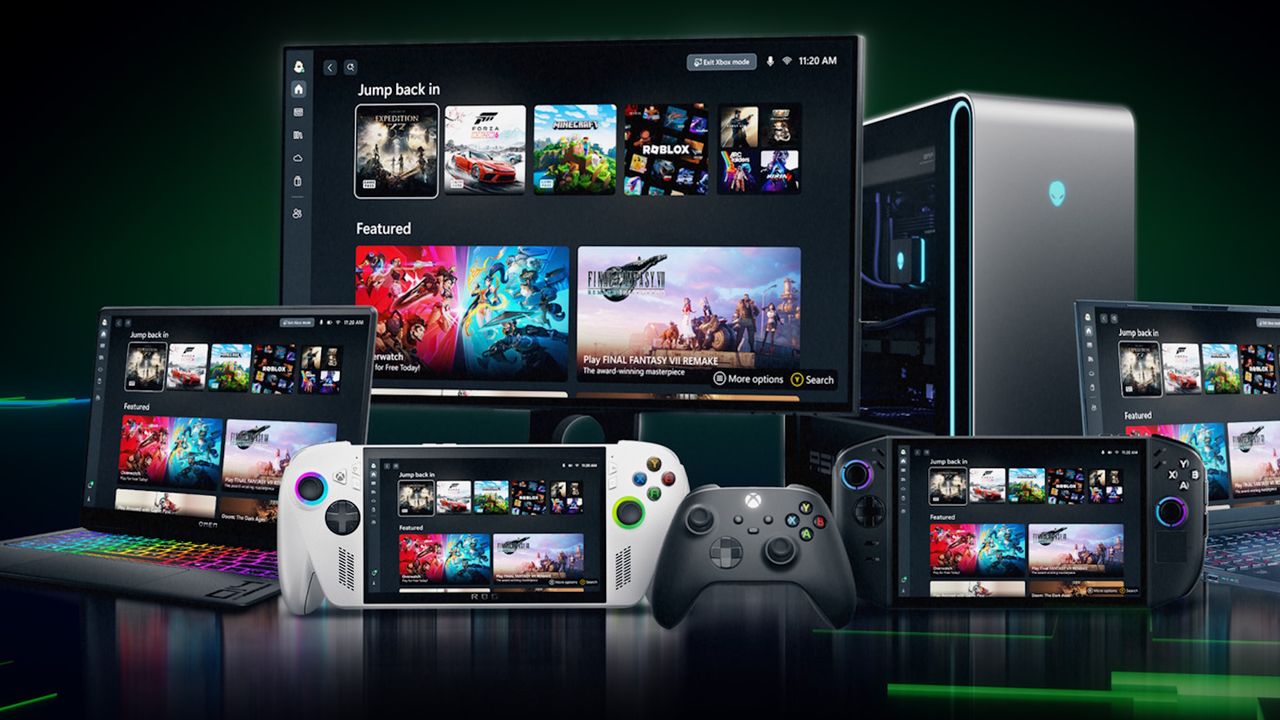
And what does that membership get you? "Xbox mode is designed for the moments when you want your games to take center stage on Windows 11 PCs and handhelds," the veeps explained. "Inspired by the Xbox console experience, Xbox mode offers a streamlined interface that puts your library and recently played titles within easy reach while minimizing background distractions."

In practical terms, Xbox mode enables users to:

  • Browse and launch games using a controller optimized interface.
  • Jump back and forth between Xbox mode and the Windows 11 desktop whenever you want.
  • Access an aggregated game library, including the full games catalog from Xbox Game Pass, and installed games from leading PC storefronts.

Like PC Gamer hardware writer James Bentley, I don't see any value to this on a personal level: For conventional sitting at your desk PC use (which I maintain is the only proper kind of PC use), mouse and keyboard just isn't going to be beat.

Keep up to date with the most important stories and the best deals, as picked by the PC Gamer team.

But for PC gaming from the couch (or bed, as the case may be), a controller is clearly a better option—and also entirely unsuitable for the standard Windows interface. So, much like Steam's Big Picture mode, I can see where there's a place for this sort of thing, even if I'll never use it myself.

For Microsoft, the new Xbox mode is one piece of a bigger puzzle: "To make Xbox feel consistent across screens while giving you more choice in how and where you play."

"Windows has long been an important part of the PC gaming ecosystem, supporting innovation through its open platform. Together with Windows, Xbox is taking everything we’ve learned about building a world-class operating system for gaming and continuing to evolve the experiences that meet players where and how they choose to play."

Of course, this is far from the first time Microsoft has committed itself to becoming a driving force in PC gaming. And, as I said last week when Xbox CEO Asha Sharma and CCO Matt Booty shared their own commitment to gaming on PC, it has never, in the Xbox era, added up to anything. Even today, the Xbox experience on PC sucks: I've recently been playing Sea of Thieves with my PC Gamer pirate pals, using the Microsoft Store edition of the game, and it works but it feels decidedly cumbersome and unfriendly compared to the point-and-shoot simplicity of Steam.

That can be turned around, and this new Xbox mode might be the first step in that process, but whether Microsoft has the commitment and will to make it happen, we'll have to wait and see.
Share:

More in Xbox, PC

Mortal Shell 2: Holding Cells walkthrough (Part 8)🖥 PlayStation, Xbox, PC

Mortal Shell 2: Holding Cells walkthrough (Part 8)

!(https://assetsio.gnwcdn.com/mortal-shell-2-well-entrance-to-holding-cells.jpg?width=690&quality=85&format=jpg&auto=webp) If you've been following along with our Mortal Shell 2(https://www.rockpapershotgun.com/games/mortal-shell-2) walkthrough, then the last two areas you conquered were the Blackridge Cliffs(https://www.rockpapershotgun.com/mortal-shell-2-walkthrough-part-6-blackridge-cliffs) and the Gloomshade Grove(https://www.rockpapershotgun.com/mortal-shell-2-walkthrough-part-7-gloomshade-grove). In both areas, you've found wells which I specifically told you not to descend yet. Well, now it's time to discover what lies below. The Holding Cells form a large subterranean dungeon which bridges the gap between the two regions of Fainweald. It's a dungeon with a couple of hidden secrets, several key collectibles, and one very dangerous boss fight. If you need a helping hand through the area, then you're in the right place! Below I'll take you step by step through every part of the Holding Cells in Mortal Shell 2. Read more(https://www.rockpapershotgun.com/mortal-shell-2-walkthrough-part-8-holding-cells)

RockGuides / Walkthroughsabout 14 hours ago
Mortal Shell 2: Gloomshade Grove walkthrough (Part 7)🖥 PlayStation, Xbox, PC

Mortal Shell 2: Gloomshade Grove walkthrough (Part 7)

!(https://assetsio.gnwcdn.com/mortal-shell-2-bloodcursed-lithopod-close-up.jpg?width=690&quality=85&format=jpg&auto=webp) In the last part of our Mortal Shell 2(https://www.rockpapershotgun.com/games/mortal-shell-2) walkthrough, we carefully dismantled every enemy in the dangerous Blackridge Cliffs(https://www.rockpapershotgun.com/mortal-shell-2-walkthrough-part-6-blackridge-cliffs), which proves that you're ready for another major area of Fainweald: the Gloomshade Grove, to the west of Widow's Overlook. This expansive area, like the Blackridge Cliffs, is a gateway to several other regions. But as always, I like to keep this walkthrough as intuitive as possible and clear the map one area at a time. And Gloomshade Grove has a lot of excellent valuables to find - including a brand new weapon and sidearm! In this guide, I'll walk you step by step through the Gloomshade Grove in Mortal Shell 2, highlighting all collectibles along the way, and explaining how best to tackle every single enemy, boss, and challenge in the right order. Read more(https://www.rockpapershotgun.com/mortal-shell-2-walkthrough-part-7-gloomshade-grove)

RockGuides / Walkthroughsabout 19 hours ago
Mortal Shell 2: Blackridge Cliffs walkthrough (Part 6)🖥 PlayStation, Xbox, PC

Mortal Shell 2: Blackridge Cliffs walkthrough (Part 6)

!(https://assetsio.gnwcdn.com/mortal-shell-2-naylshotting-tarred-vestige.jpg?width=690&quality=85&format=jpg&auto=webp) If you've been following along with our Mortal Shell 2(https://www.rockpapershotgun.com/games/mortal-shell-2) walkthrough up to this point, you'll already have dipped your toes into the area known as the Blackridge Cliffs. So far, all you've done here is cleanse the Blackridge Pass Beacon at the very start of the area, and then return to less challenging grounds. But now it's time to delve into this dark region and reap it for all its rewards. And those rewards are plentiful. Inside Blackridge Cliffs, you'll find a brand new weapon, your next Shell (the lovely Proxima), and a host of useful materials. On the flipside, they're all guarded by some horrifying new enemies. So let's take it a step at a time with our full 100% Blackridge Cliffs walkthrough. Read more(https://www.rockpapershotgun.com/mortal-shell-2-walkthrough-part-6-blackridge-cliffs)

RockGuides / Walkthroughs3 days ago