Steam Controller review: Valve’s new controller is a near-perfect PC gamepad
Overview & Key Takeaways
Valve's second attempt at the Steam Controller is a major improvement over the first, though it comes with a few quirks.
It was 10 years ago when a coworker placed a Steam Controller in my hands. I had no idea what I was holding. It was a foreign object to me, tossing decades of conventional wisdom to the curb in favor of two bizarre trackpads. I wrote it off immediately after struggling to manage Doom’s radial weapon menu and laughed it off as another one of Valve’s kooky ideas. Why reinvent the wheel?
What a difference a decade makes. Over the last few weeks, I’ve spent so much time with Valve’s second attempt at its Steam Controller that I can’t imagine playing my PC games with anything else. With its more familiar design, excellent ergonomics, and seamless Steam connectivity, Valve has finally proved that its quirky first draft had its head in the right place; it just needed the right revisions. The final product still leaves room for improvement, much like the Steam Deck, but Valve has finally cracked a console-worthy PC controller with some strings attached.
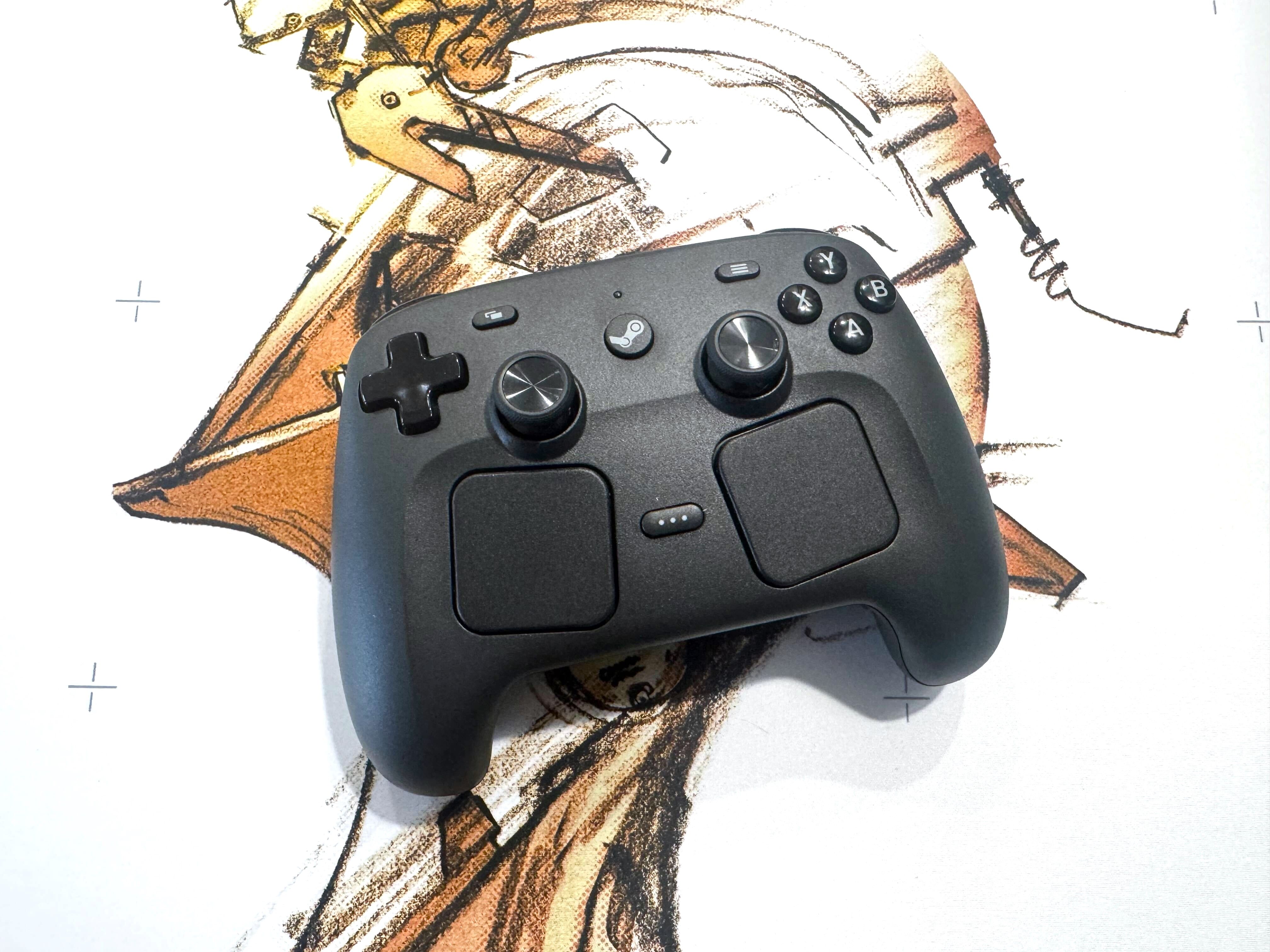
When you first see the Steam Controller in-person, it might make you instinctively recoil. Its boxy shape makes it look a bit like a high-end Nintendo Switch Joy-Con Grip, the polarizing peripheral that lets you slot your Switch controllers into a gamepad form factor. (I’m a fan, personally.) Any concerns you have about comfort are likely to disappear once you actually pick it up. The Steam Controller might be the most naturally form-fitting controller I’ve ever held. It makes my Xbox Wireless Controller feel like a dense brick in my palms.
What’s the secret? It’s a lot of subtle decisions that add up. For one, it's remarkably lightweight given its size. It’s similar to the Steam Deck in that regard, which looks far heavier than it actually is. It’s also built from a smooth black plastic that also makes it feel like the Steam Deck on the hand. The grips are much straighter than those of your average controller, which ever so slightly reduces some strain. My thumbs rest naturally on the buttons and dual joysticks in that position and can just as easily stretch down to land on the trackpads. (I imagine it might be more of a stretch for people with smaller hands, but I can only speak for my mid-sized fingers here.) Though the buttons and joysticks are scrunched up high on the game pad to make room for the trackpads, it doesn’t feel nearly as cramped as the Steam Deck’s top-heavy layout.
There’s only one caveat to the comfort: the back buttons. The Steam Controller features four round buttons on the back of its grips that feel sturdier than the Steam Deck’s square buttons that barely press inward. The Steam Controller’s back buttons feel great by comparison, with some satisfying feedback on button press, but they’re a touch too low. My middle fingers land on the top buttons naturally, but my ring fingers don’t quite line up with the bottom buttons. I’ve found that I have to do a bit of flexing to get my hands to line up in just the way I want them to. Maybe that’s the trade-off you get with the straighter grips.
Those nitpicks aside, everything feels right once I’m actually gaming with it. Part of that is thanks to the gamepad’s consistency with the Steam Deck, which has become my primary gaming device over the past few years. If you’re used to that, the Steam Controller will be very familiar. The face buttons and D-pad feel the same, but just a hair bigger. The joysticks perhaps have an extra touch of welcome resistance thanks to their TMR magnetic designs, but they’re virtually the same too. The triggers and bumpers are the only major departures; they’re smoother and more rounded. It doesn’t take much pressure to press down the triggers either. That hasn’t caused any accidents during my testing, but keep it in mind if you like a little give to your triggers.
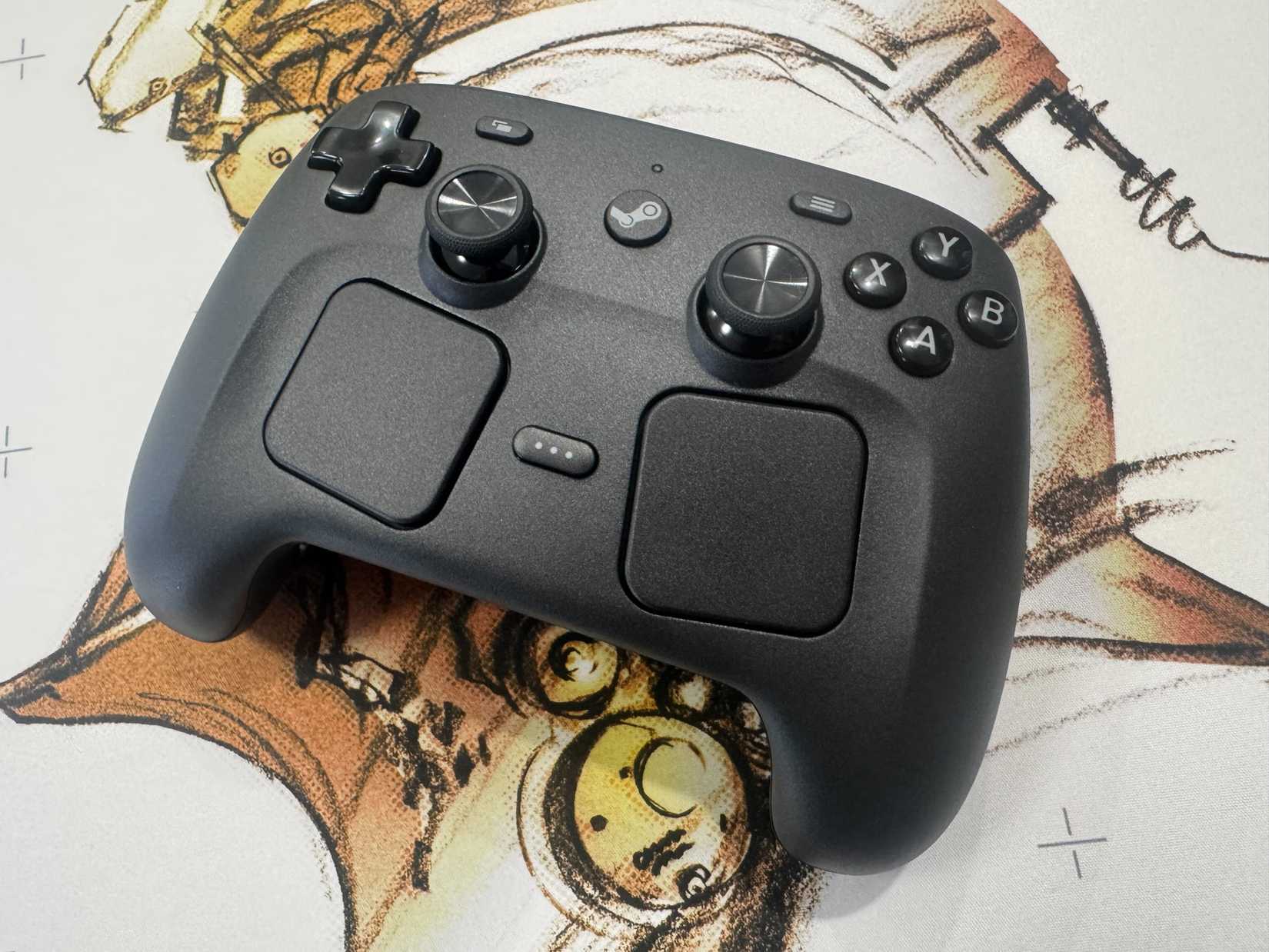 Image: Polygon
None of that is particularly new for a gamepad, but the Steam Controller’s real ace in the hole is its dual trackpads. Once again, what you’re getting here is pretty much in line with the Steam Deck. They’re two square, haptic pads that your thumbs can glide across to simulate a mouse. They’re much bigger than the pads on the Steam Deck, giving you more space to roll around. I’ve gotten great use out of them in Sol Cesto, a game that is exclusively mouse-controlled. Being able to roll and click on my laptop, just as I have been on my Steam Deck, means that my experience with it is now far more consistent from device to device. And that consistency will continue once the Steam Machine launches, as the Steam Controller will be compatible with that too.
Gyroscopic controls are an option too, though that's where Valve gets a little too experimental. The Steam Controller has a new feature dubbed Grip Sense, which allows you to enable gyro controls on the fly by tightening your grasp around the controller. I've yet to get working consistently enough to consider using it outside of testing. Valve says that you hold and release the controller grips to enable and disable the controls, but I've had trouble getting that to work. Instead, I have to keep my hands tightly wrapped around the controller to use it. If I loosen up in just the wrong way, it stops working. I'll need to spend more time with it to see if I can get the hang of it long-term, but for now, it feels like an optional gimmick that I imagine most players will ignore altogether.
If you’re using the Steam Controller exclusively with Steam, it’s a match made in heaven. To pair it to a computer, you plug a small, rectangular puck that comes bundled with the controller into your PC. That magnetically snaps onto the back of your Steam Controller, pairing it to Steam. Once you’re linked, the controller instantly turns on and connects to Steam when you press the central Steam button. (Double pressing that button opens Big Picture Mode, which is a handy shortcut.)
You can even pair multiple controllers at once using the puck, though that can take more fiddling than expected. I had to keep attaching and reattaching the puck to trigger a system update prompt, which didn’t install properly the first few times I tried it. Sometimes I’d plug the controller in and it would pop open a bunch of random windows on my laptop. I did get it to work eventually, and once I did, my girlfriend and I were able to seamlessly play Cuphead and Vampire Survivors. Getting everything set up a second time was similarly tricky, so there are still some quirks to be worked out there.
The puck also works as a charger, which is a great bit of engineering, though you probably won’t want to use it as a full wired solution. The puck pops off the controller too easily to rely on it. You likely won’t need it, though, as Valve estimates that the controller’s battery can last up to 35 hours with heavy trackpad usage. I haven’t had it suddenly run out of juice on me yet, in part because I tend to snap the puck onto it when it’s resting. It’s just so easy to do that it’s become second nature when I finish a gaming session.
Bluetooth connectivity is an option too, but that’s more of a pain. There’s no Bluetooth pairing button on the controller itself. Instead, you have to hold down three buttons to pair a controller, and press a different three-button combo to de-sync it. I tried to wrangle that, going back and forth between my laptop and my Steam Deck, but it ended up being a hassle. I’ve mostly resolved to use it with my laptop exclusively to avoid having to overcomplicate things.
That’s the price you pay for innovation, I suppose.
There’s one catch to all of this, and it’s a fairly big one. The Steam Controller only plays nice with Steam proper. When you plug it in, your computer basically recognizes it as a mouse and keyboard. I found that out when I tried to play Replaced through the Xbox app, only to discover that I couldn’t do much more than move the mouse around. I could fully play Vampire Crawlers that way, thanks to its reliance on mouse controls, but the game defaulted to a PC interface, so I had to manually click to end a turn rather than pressing a face button as I can on a regular controller. You can use it on mobile devices through Steam Link, but apps like the Epic Games Store or Ubisoft Connect just won’t recognize it as a proper controller.
Valve has its reasons for making it work like that, all of which come down to the nuances of API. For the Steam Controller to work with all its unique features, it simply has to be running through the Steam client. (That means that it can’t connect to a console aside from the upcoming Steam Machine either.) While that may be a technical reality, it puts a dent in the Steam Controller’s utility as the ultimate PC gamepad. There are ways to deal with that considering that Steam allows you to add a non-Steam game to the app, but it’s a little annoying to do that when any other controller tends to work out of the box on any PC app I connect it to. That’s the price you pay for innovation, I suppose.
That price isn't cheap either. At $99, the Steam Controller is more expensive than your standard Xbox or PS5 controller. It's more in-line with premium third-party gamepads like the Scuf Valor, though still much lower than high-end options like the Xbox Elite Series 2. Considering that you're getting haptic trackpads here, a unique feature that you won't find on any other controller, the extra cost feels fairly justified. But with a higher price tag comes higher expectations. The fact that it only really works with Steam starts to sting more than it would if it were more competitively priced. (And the fact that you don't even get a headphone jack for the cost hurts, too.)
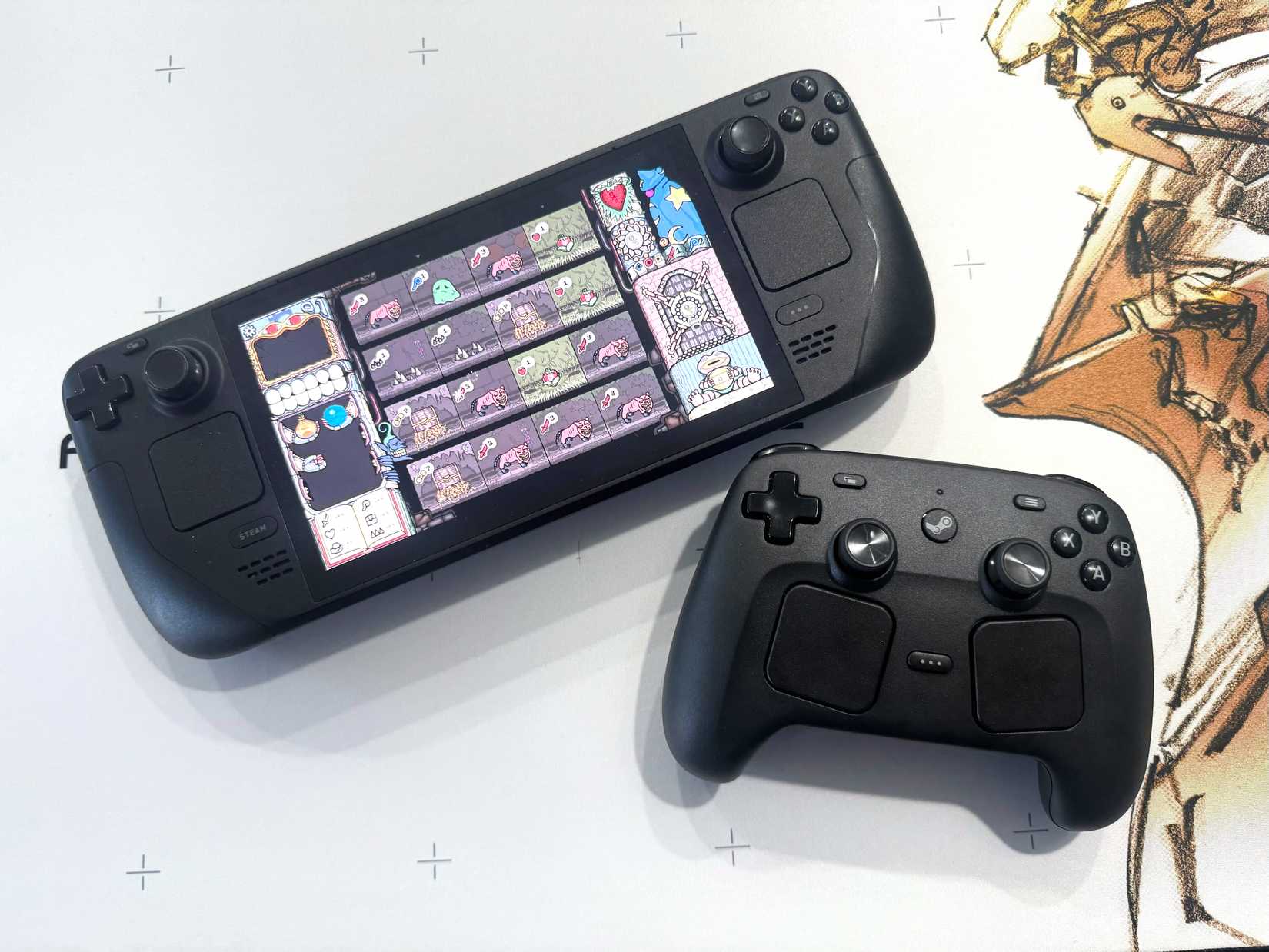 Image: Polygon
The Steam Controller ultimately makes the most sense for PC players who are very committed to the Steam ecosystem. If you play the majority of your games there, own a Steam Deck, use Steam Link, or plan to pick up a Steam Machine whenever it drops (we’re still waiting), it’s a bit of a no-brainer. It connects to all of those things seamlessly, giving it a lot more utility than Valve’s first shot at a gamepad had. And it’s one of the most comfortable controllers I’ve ever used, to boot.
There are plenty of blemishes, some that just can’t be fixed until Valve releases a full iteration, but there’s good reason to think the experience will improve. After all, the Steam Deck was very temperamental when it first release. Many of its issues were addressed in system updates, and now it feels like a different piece of hardware altogether. I wouldn’t be surprised if Valve pulls that same trick with the Steam Controller, patching in some pairing fixes or getting the controller to work on third-party launchers. If it can do that, I don’t think I’ll ever need another PC gamepad again.
The Steam Controller will be available to order on May 4. It was tested using two prerelease units provided by Valve. You can find additional information about Polygon’s ethics policy here.