Beast of Reincarnation: How to save your game
Summary
Beast of Reincarnation features a host of challenging golem foes and mutated creatures for Emma and Koo to confront as they travel through post-apocalyptic Japan, and considering that you're going to be dying a lot over the course of your journey, knowing how to save your game is a must.
While saving isn't hard, it might not be obvious at first if you've only just started playing. In this quick guide, we'll explain exactly how to save your game in Beast of Reincarnation, and we'll also explain the difference between Auto Saves and Manual Saves.
Beast of Reincarnation features a host of challenging golem foes and mutated creatures for Emma and Koo to confront as they travel through post-apocalyptic Japan, and considering that you're going to be dying a lot over the course of your journey, knowing how to save your game is a must.
While saving isn't hard, it might not be obvious at first if you've only just started playing. In this quick guide, we'll explain exactly how to save your game in Beast of Reincarnation, and we'll also explain the difference between Auto Saves and Manual Saves.
To see this content please enable targeting cookies.
Manage cookie settings
How to save your game in Beast of Reincarnation
There are two types of saves in Beast of Reincarnation:
- Auto Saves: These seemingly occur during major moments, such as entering a new zone or after certain flashback sequences. It is not immediately clear when the game is autosaving, and you should not rely on Auto Saves to maintain your progress.You can start from the position of your last Auto Save by selecting Continue on the Title Menu.
- Manual Saves: These are Saves that you've manually made either at a Camp or in Bauera the Cleanse Walker. You can access your Manual Saves by selecting Load Game on the Title Menu.
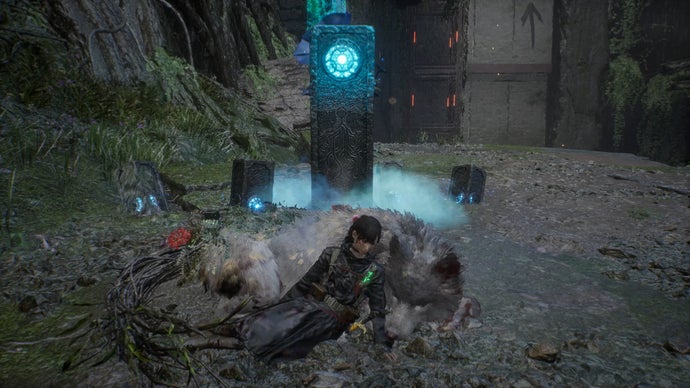
To make a Manual Save, find a Camp out in the world. These are the shrines and small fires where Emma can upgrade her skills, rest, enhance her weapons, and so on, and you'll find many of them scattered throughout Beast of Reincarnation's various zones. Select Save Game when you're at one of these spots.

Saving at Camp is the way to go when you're out in the wild. | Image credit: Rock Paper Shotgun/Game Freak
You can also make a Manual Save when you're in Bauera the Cleanse Walker, the large moving base that Emma returns to throughout the game. If you haven't unlocked Bauera yet, you're still in the beginning, so keep playing past Beast of Reincarnation's first hour or so. Once inside Bauera, you can make a Manual Save by navigating over to the Attribute Portal, the glowing interface near the Workbench. Then, select Save Game.
It's worth stressing again that making Manual Saves is the way to go. Auto Saves basically only exist to ensure that you won't lose everything if your game suddenly crashes without warning after several hours of playtime.

Typically you'll return to the Cleanse Walker at the end of a mission or a boss fight to rest, craft, and recover. Might as well save while you're at it! | Image credit: Rock Paper Shotgun/Game Freak
And now you know how to save your game in Beast of Reincarnation. It's pretty easy, but it's always worth knowing how to save, especially in a tough game full of parrying action like Beast of Reincarnation. We've also got another quick guide on how to change languages in Beast of Reincarnation if you were unaware, as well as how to get the Red Key and the best skills to unlock first.